Unifying terminology & UX across interoperable products

- Audited conflicting terminology across two newly merged products and determined the root cause of confusion
- Defined a unified terminology system that replaced six overlapping concepts with one clear structure
- Validated new terminology with users via survey before bringing it to stakeholders
Problem
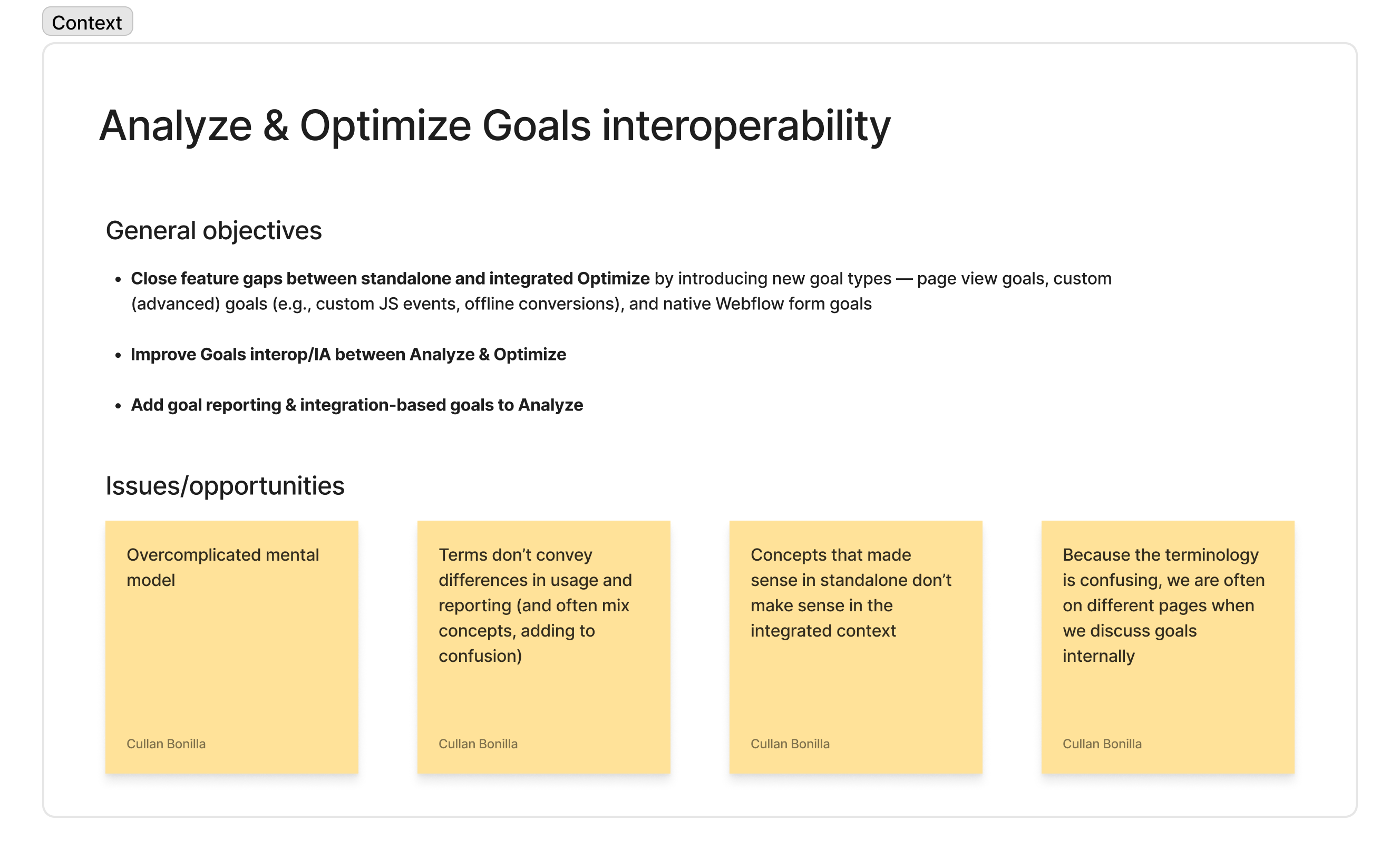
In 2024, Webflow acquired Intellimize, an A/B testing platform that would later become Webflow Optimize. The same year, Webflow also introduced Analyze, its native solution for site analytics. Both products let users define and track “goals” — conversion objectives like button clicks, form submissions, etc. — but they had been designed independently.
Bringing them together was a larger interoperability effort that involved closing feature gaps between standalone Optimize (aka Optimize for sites not hosted on Webflow, fka Intellimize) and integrated Optimize (aka Optimize for Webflow-hosted sites), improving the IA connecting Analyze and Optimize, and adding goal reporting where it didn’t yet exist. My work spanned terminology and the overall goals UX.
Key challenges
Terminology that made sense in the context of Intellimize didn’t hold up in the integrated Webflow Optimize product, and Analyze had developed its own separate vocabulary for the same underlying concepts.
Several terms that described a goal’s state or designation (e.g., account goal, primary goal, optimization goal) were treated in the product as distinct types of goals, but none of them actually described what the goal tracked.
Goal
Define unified goals terminology across Analyze and Optimize that accurately reflects how goals are defined and tracked, while remaining familiar to marketers who previously used Intellimize or comparable analytics and A/B testing tools.
Process
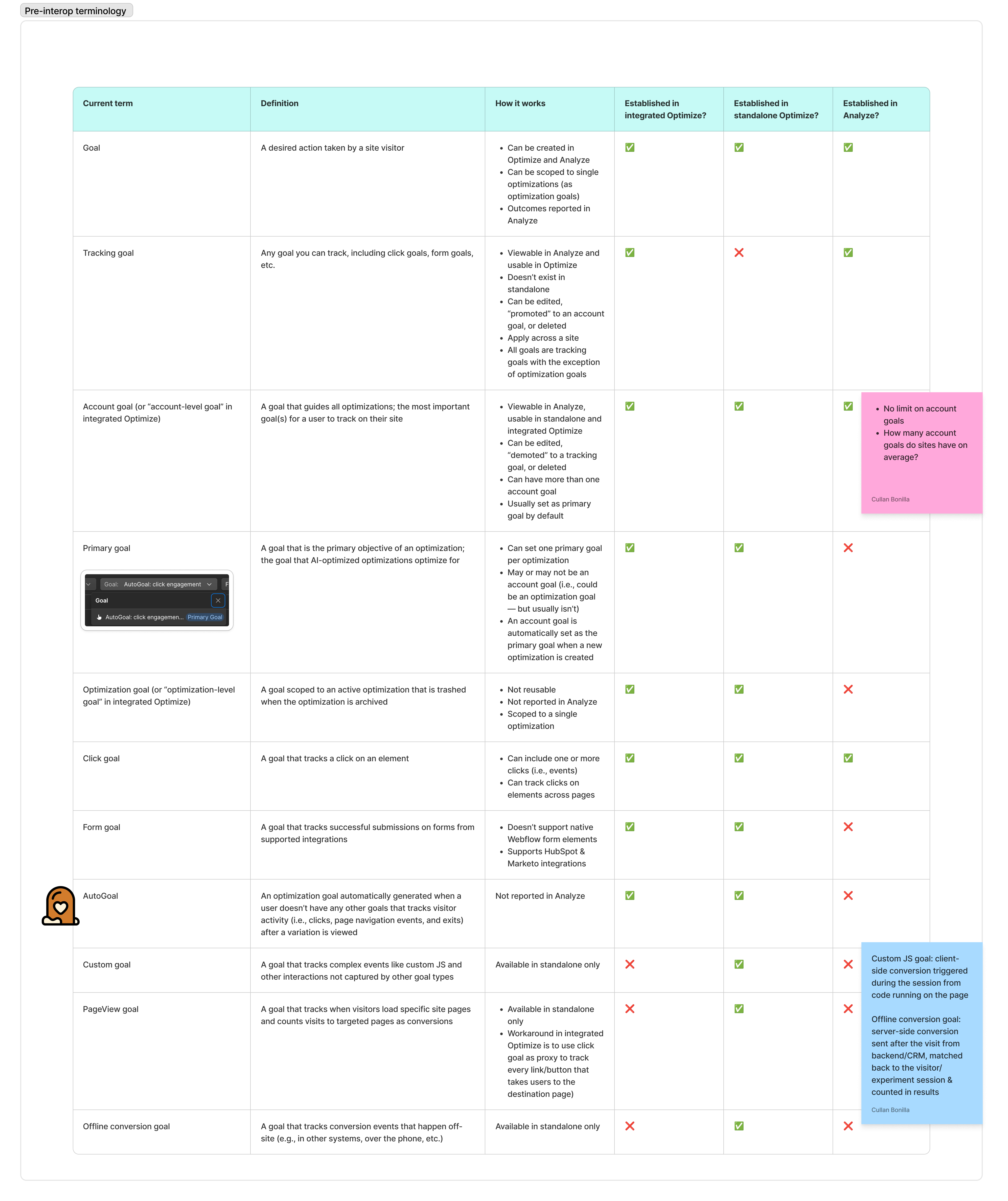
Auditing existing terminology
I mapped where every term in use had (or hadn’t) been established across integrated Optimize, standalone Optimize, and Analyze.
Reframing types vs. designations
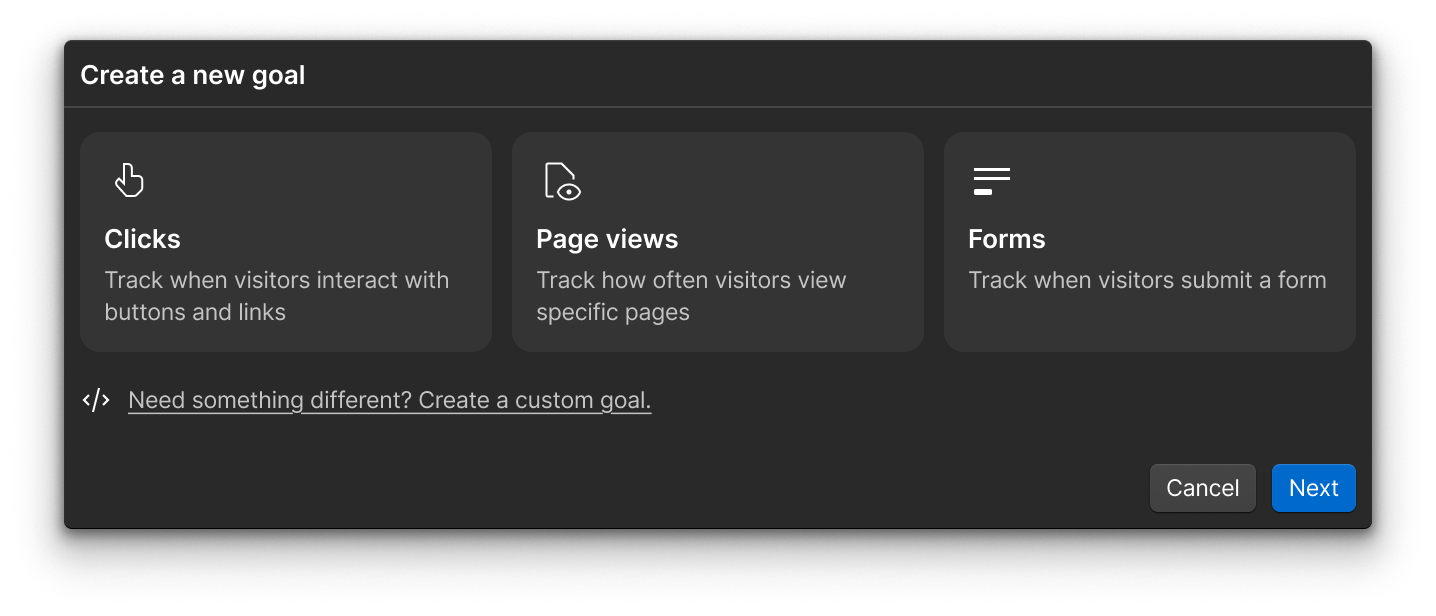
I decided that a goal’s type is what it tracks (e.g., clicks, page views, form submissions, custom events) while everything else — its importance, scope, and reusability — is a modifiable state rather than a distinct category. The name for each type needed to work as a plain answer to the question: “What does this goal track?”
If “site goal” is a state rather than a type of goal, the reporting view needed to introduce it without introducing another filter option next to the true goal types. I proposed a separate, pinned section for site goals within the reporting view instead, which let users view their most important goals quickly.
Naming the designations
Rather than reconciling six overlapping categories, I named a single unifying concept (goal), a small set of types, and a small set of designations or states.
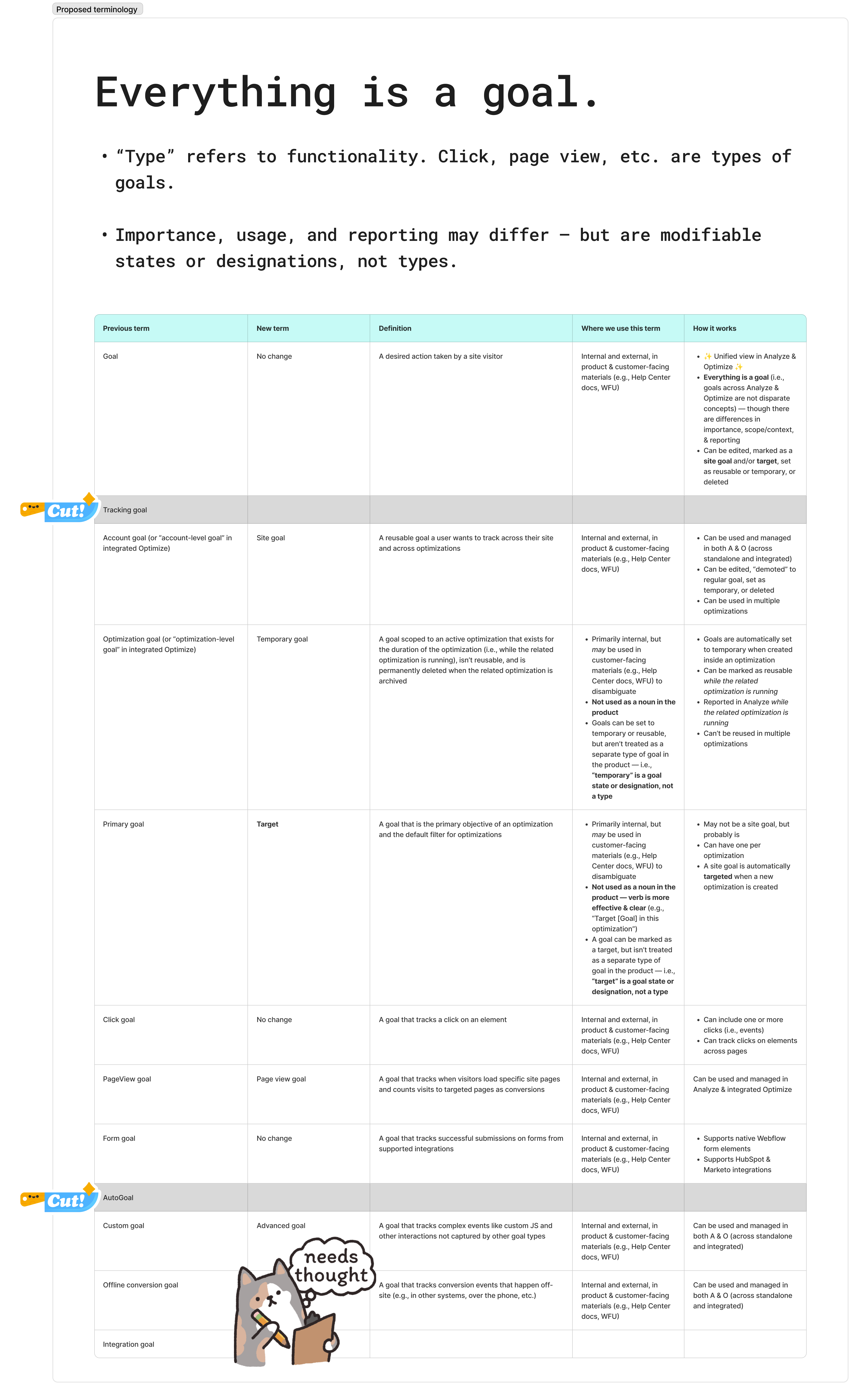
Account goals became site goals to reflect how the Webflow product actually works. Goals are set and tracked at the site level. Optimization goals became temporary goals, an internal-only designation; the product already communicates scope through behavior, so customers didn’t need a dedicated term for it. Primary goals became targets, which clarifies that this is a designation applied to an existing goal, not a type of its own. It also works as a verb (“Target X goal in this optimization”) to reinforce its behavior.
Custom goal and offline conversion goal had opposite problems — “offline conversion” was too specific for what it actually was, and “custom goal” was too broad. I tried renaming custom goal to advanced goal first to reflect the setup required, but “advanced” read as a difficulty level, rather than a type, so I reverted it. Custom goal stayed as an umbrella term instead (“What does this goal track?” → “Custom events”), and on-site and off-site conversion became two paths inside it. The fork in the UI, along with descriptive help text, helped customers find the right setup instructions for each.
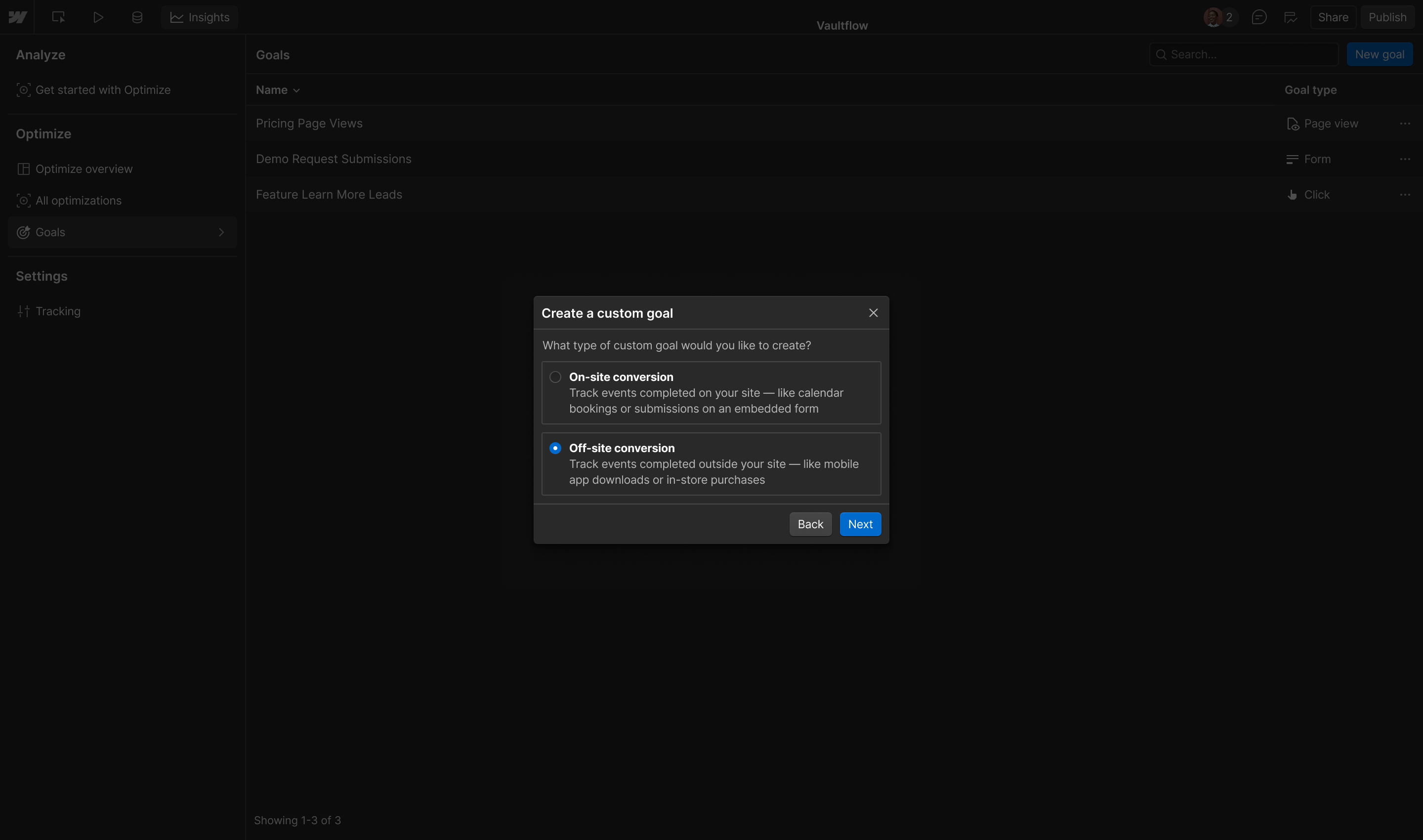
I cut two legacy terms – “tracking goal,” which was redundant (all goals are tracking goals), and “AutoGoal,” which existed only in Optimize and wasn’t applicable in the interoperable product.
Show the finalized interop terminology
| New term | Previous term | Definition |
|---|---|---|
| Goal | Tracking goal (sometimes) | A desired action taken by a site visitor |
| Site goal | Account goal | A key objective for a site, tracked site-wide and across optimizations |
| Temporary goal (internal only) | Optimization goal | A goal scoped to an active optimization; not reusable, deleted when the optimization is archived |
| Target | Primary goal | The designated goal an optimization uses to measure success and declare a winning variation |
| Click goal | — | A goal that tracks clicks on an element |
| Page view goal | PageView goal | A goal that tracks visits to specific pages as conversions |
| Form goal | — | A goal that tracks successful form submissions |
| Custom goal | — | A goal that tracks complex events not captured by other types |
| Off-site conversion | Offline conversion | A server-side conversion synced from a CRM, matched to the original visit |
| On-site conversion | Offline conversion | A client-side conversion captured by code running on the page |
Validating the direction
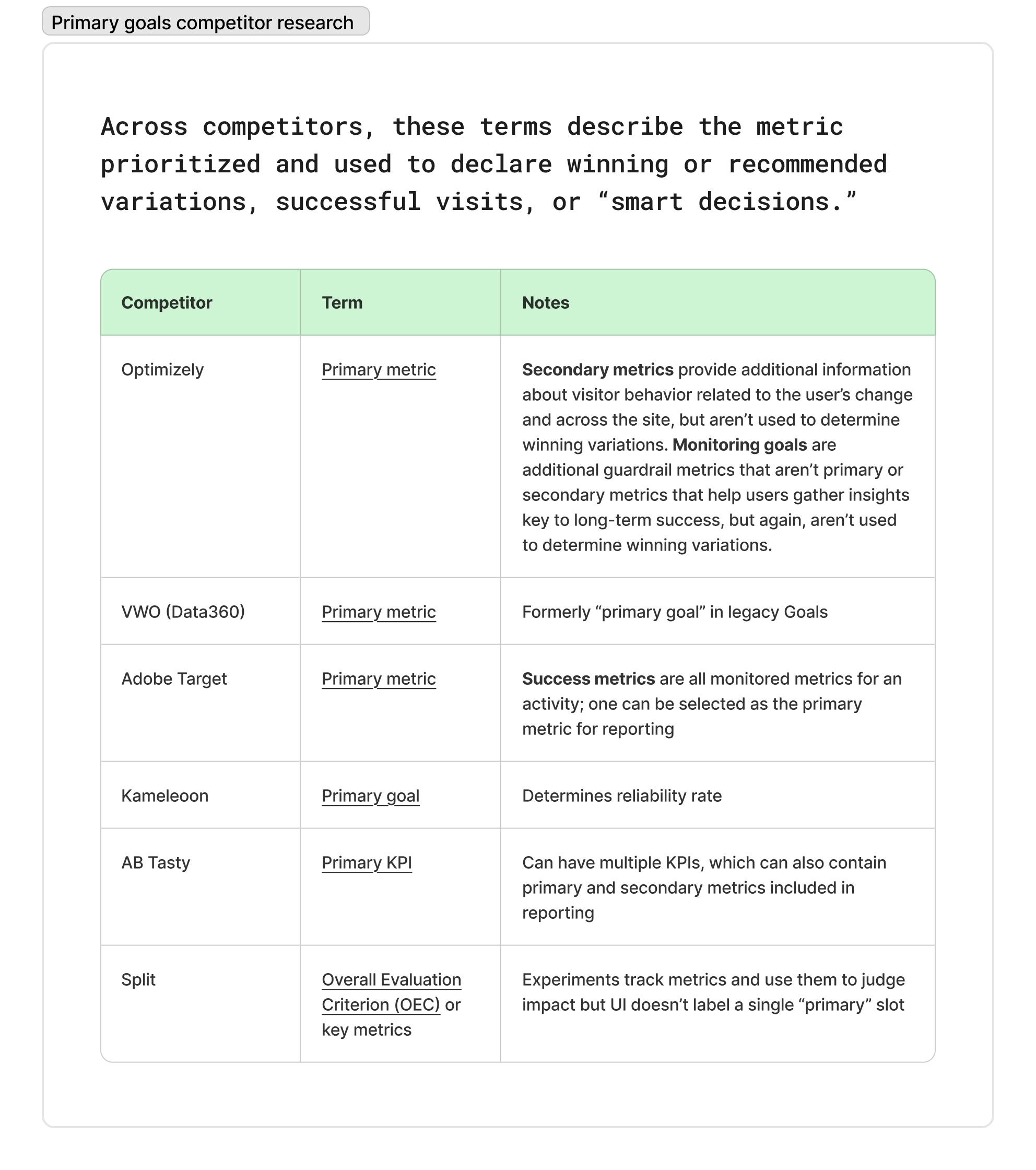
I checked “target” against competitor conventions. Most similar tools use some version of “primary metric,” and in every case, it’s a designation applied to a metric rather than a distinct object, which matched my reasoning.
I co-designed an unmoderated study with my product design partner, reviewed by the user research team, to validate the proposed terminology before finalizing my recommendation to stakeholders.
Results
The study came back at 100% comprehension across 12 participants. The final proposal resolved the type vs. designation confusion that made the pre-interop model difficult to reason about both internally and externally.
Reflections & learnings
One difficult call was deciding what to surface to customers vs. keep internal. “Temporary goal,” for example, needed to exist as a concept for the team to build, reason about, and discuss, but surfacing goal lifecycle would have added unnecessary cognitive overhead.